Your AI Support Bot Deserves a Dashboard That Actually Works for You

In previous articles, we introduced Askly — Avivi’s AI-powered customer support bot that you can try live on our website right now. This time, we’re pulling back the curtain to show how a company manager actually experiences working with Askly from the inside. We’ll walk through the dashboard we built to make that experience smooth, informative, and efficient. And as a bonus, we’ll show you how we exported the same solution directly into a WordPress admin panel for one of our clients.
Every Great Product Needs an Interface That Gets Out of the Way
Any commercial software product should be simple, intuitive, and effective to use. If it isn’t, the advantage it was supposed to create becomes a burden instead. That’s exactly why dashboards exist — a single place where all the information you need and all the controls you use are available on one screen, in real time.
A dashboard is a must-have when you’re building your own product. Nobody else knows what needs to be displayed, or how it should all come together, better than you do. Think of it like the instrument panel in a car: one glance tells you your speed, your fuel level, and everything else that matters — without digging through menus.
If you’d like to go deeper on the value of custom dashboards in general, we covered that in a dedicated article: "How can a top manager get a dashboard and generate any analytical report for the business?" And for the full story on Askly itself: “Askling” — a bot for your website that tells others everything about your business. We made it for ourselves, we offer it to you".
In this article, we’re focused on the management side — what it looks like to work with the bot when you’re the one running the business, not the one asking questions. We’ll close with the WordPress integration bonus.
A Quick Refresher: What Is Askly?
Askly is a specialized AI support bot designed to answer your customers’ questions using a knowledge base you build and maintain. It runs on a Retrieval-Augmented Generation (RAG) system, which means it doesn’t just search for keywords — it actually understands what’s being asked and responds with the most relevant prepared answer.
Avivi built and refined Askly for our own client support operations, then packaged it as a standalone product for other businesses. It can run as a widget embedded in your website, on a dedicated page, or as a Telegram bot — depending on what works best for you.
The bot operates from a knowledge base you upload in a simple Q&A format:
-
Company overview and services;
-
Product and service descriptions;
-
Shipping policies and delivery terms;
-
Payment options;
-
Any other FAQs specific to your business.
The AI handles interpretation intelligently. If a visitor types something as minimal as “contact,” Askly reads that, understands the intent, and responds with your company’s contact information. No keyword matching required.
If someone asks something completely outside your business context — like “how do I care for a cactus?” — Askly recognizes it’s not relevant, flags it, and routes it to a live team member. The Q&A knowledge base can be updated and expanded at any time.
So Why Do You Need a Dashboard?
The functionality described above runs entirely on the backend. It works automatically, 24 hours a day, 7 days a week, 365 days a year, without any human intervention. The Q&A management happens through the AI model configuration interface — not the bot itself.
But that leaves some important questions unanswered for the people running the business:
-
How do you know when someone has reached out to the bot?
-
How do you see what a user asked when the AI couldn’t find an answer?
-
Where do you track overall conversation volume and trends?
A developer can see all of this. A company manager typically cannot — until a dashboard is built.
Initially, unanswered questions were sent to the company via automated email. As the product evolved, we replaced that with a real-time, single-window management interface. The result is the Askly dashboard.
Design That Serves a Purpose
Any interface needs intentional design — otherwise there’s no connection between the technology and the person using it. For a dashboard, the most critical design principles are usability, layout efficiency, and information density: the manager should be able to see everything relevant on one screen at the same time.
We developed several design concepts for the Askly dashboard before landing on the right one. Our core criteria:
-
Minimalist layout — no visual clutter;
-
Restrained color palette — professional and easy on the eyes;
-
Functional element placement within a single window.
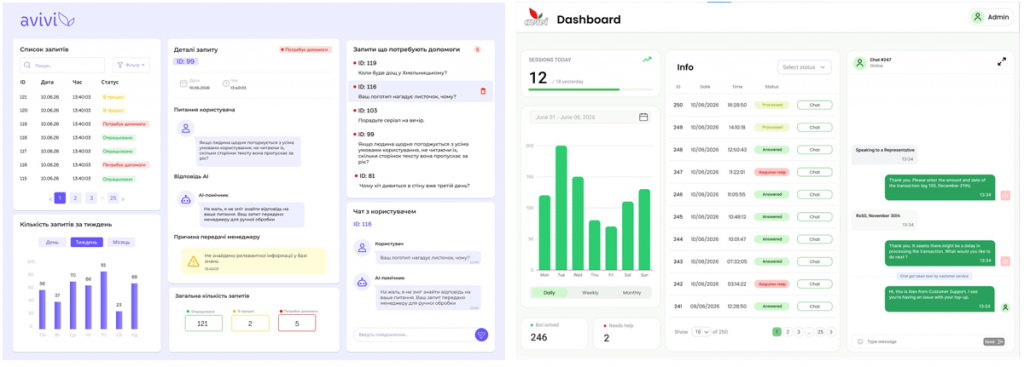
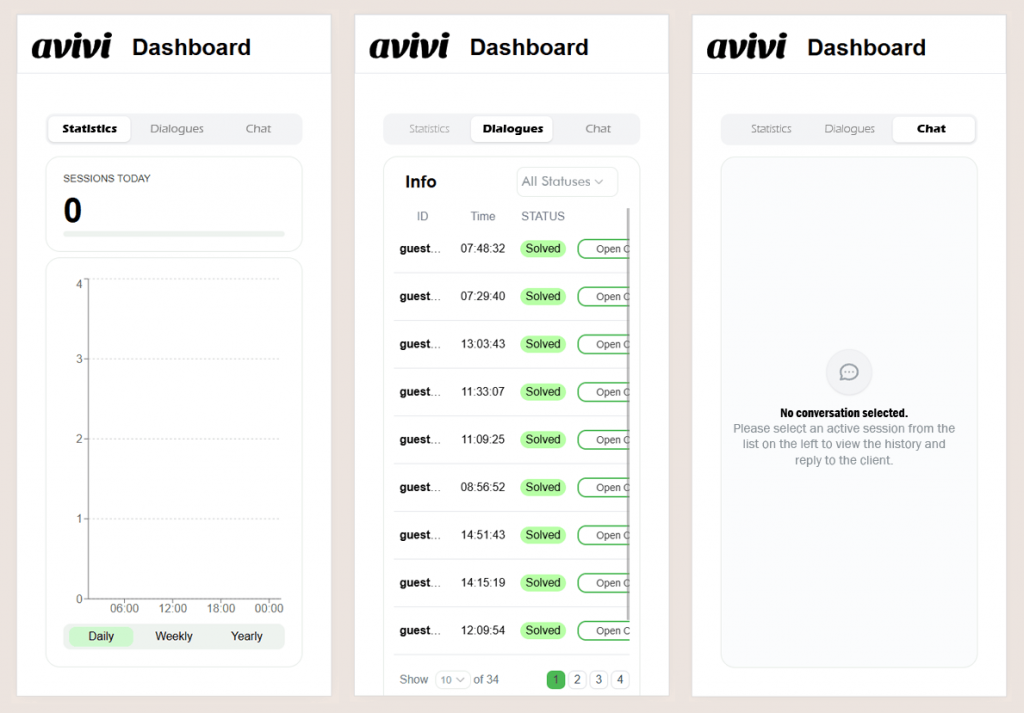
After testing and iteration, we settled on a muted green palette. The desktop version crystallized into a three-panel layout: a statistics panel on the left, a session list in the center, and an active conversation view on the right. This structure puts everything on one screen while tucking additional features into secondary sections.
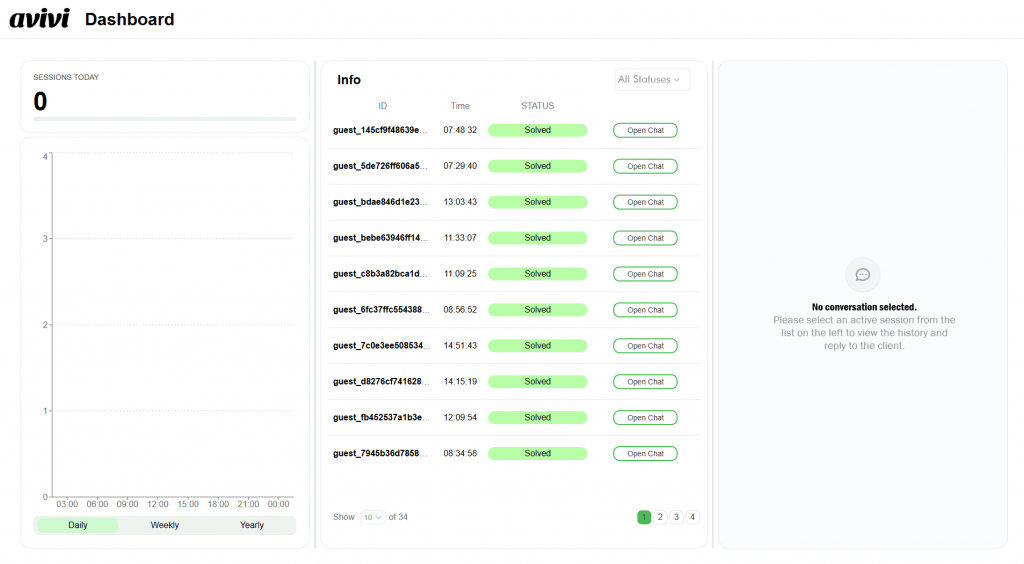
The mobile version is equally functional, organizing the same three sections into separate tabs for clean navigation on smaller screens.
What the Dashboard Actually Shows You
Left Panel: Statistics
The left panel displays conversation volume: requests per hour for today, plus weekly, monthly, and annual totals. Clean, fast, and always current.
Center Panel: User Sessions
The center panel shows user sessions. Since Avivi’s website doesn’t require visitors to register or log in, Askly operates in session mode:
-
Each new conversation is assigned a unique session ID tied to the visitor’s IP address;
-
The bot maintains context throughout a single session;
-
Sessions remain active for approximately 30 days.
This means a visitor can close the browser tab, come back two days later, and still see their full conversation history with the bot or a team member. The session-based approach is a direct result of not requiring user authentication.
If your users have accounts on your website, this is even simpler: Askly stores conversation history permanently and always knows exactly which user it’s talking to.
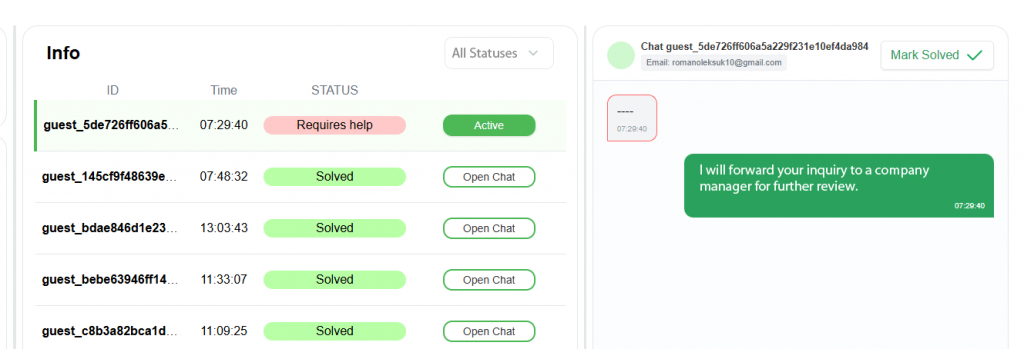
Each session carries one of two statuses: Needs Attention or Resolved.
Needs Attention is assigned automatically when the AI can’t find an adequate answer and flags the conversation for a team member — alongside a parallel email notification. Once a manager joins the conversation and resolves it, they update the status to Resolved. It can also be re-flagged as unresolved if follow-up is needed. Sessions are sortable by status, which becomes especially valuable during high-volume periods.
Right Panel: The Conversation
The right panel shows the live conversation: the visitor’s messages and the bot’s responses. A manager can step in at any point and respond directly.
In the current implementation, manager replies look identical to bot messages from the visitor’s perspective — while the manager’s interface clearly distinguishes between AI responses and their own. If needed, human messages can be styled differently for the visitor as well.
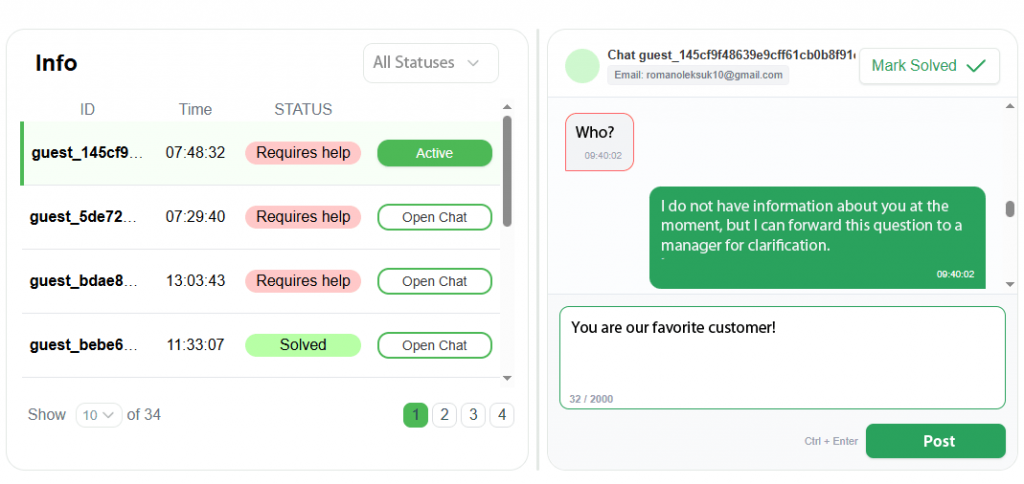
If a visitor has left their email address and closed the chat, the conversation can be forwarded to their inbox — a particularly useful fallback when there’s no account-based authentication.
Under the Hood — and the WordPress Bonus
The Askly dashboard is built in React, which means it’s fast, reliable, and responsive. It’s accessible through any browser, with manager login handled via credentials issued by the administrator. Full API documentation is available for every project.
During a subsequent implementation for one of our clients, we received a specific request: integrate the dashboard directly into an existing WordPress admin panel. Our team rebuilt the solution in Python and developed a dedicated WordPress widget to make it happen.
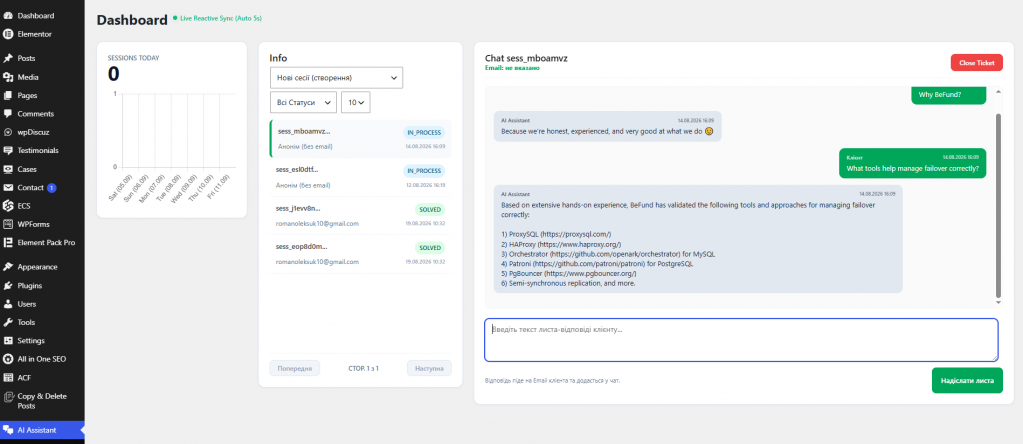
For this client, we also adjusted the panel proportions and added the ability to attach image files to manager messages. As always, the dashboard was tailored to the specific needs of the business — not the other way around.
The Bottom Line
A custom dashboard is the most effective way to organize how your team interacts with any software product — on your terms, built around your workflow.
Avivi builds dashboards that are intuitive, reliable, and genuinely pleasant to use. Whether you need a management interface for an AI support bot (including Telegram bots), a business analytics and reporting dashboard, a data monitoring solution, or anything else that benefits from bringing information and controls into one place — our development team is ready to build it for you.
Ready to see what a custom dashboard could do for your business? Contact Avivi — we’ll figure out the right solution together.

In the abstract, if you organize your business, invest a lot of money there and hire a staff of marketers, in the near future a huge queue of clients should be next to your door. But this is only in theory. In reality, you have to fight for every client, even if you have a super-successful project.

Integrations are one of the key capabilities of Bitrix24, which is why the product is appreciated all over the world. It is not always possible to find integration with the service required by the client among ready-made solutions. This is exactly what happened with Lexoffice, but the Avivi team created the integration that the customer from Europe needed. In this article, we will tell you what are the features of this project.

Quite often, customers seek to have tools for signing documents in Bitrix24. This can be achieved through integration with third-party services such as E-Sign, DocuSign, HelloSign and many others. However, it is not always necessary to have an electronic digital signature with all the legal features — in many cases, customers need it to improve their image or motivate customers. Well, the Avivi team knows how to do it simply, effectively and beautifully.
We will reach out to within 10 minutes